数据存储
数据存储设计
一对一消息存储
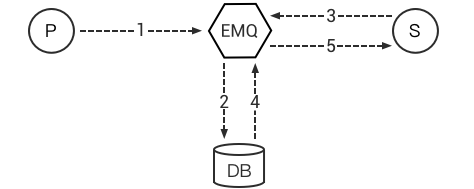
- Publish 端发布一条消息;
- Backend 将消息记录数据库中;
- Subscribe 端订阅主题;
- Backend 从数据库中获取该主题的消息;
- 发送消息给 Subscribe 端;
- Subscribe 端确认后 Backend 从数据库中移除该消息;
一对多消息存储
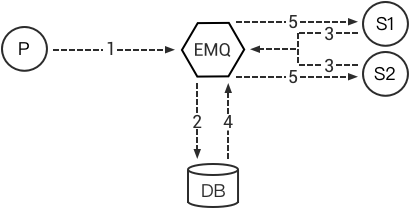
- Publish 端发布一条消息;
- Backend 将消息记录在数据库中;
- Subscribe1 和 Subscribe2 订阅主题;
- Backend 从数据库中获取该主题的消息;
- 发送消息给 Subscribe1 和 Subscribe2;
- Backend记录Subscribe1 和 Subscribe2 已读消息位置,下次获取消息从该位置开始。
客户端在线状态存储
EMQ X 存储支持将设备上下线状态,直接存储到Redis或数据库。
客户端代理订阅
EMQ X 存储支持代理订阅功能。设备客户端上线时,由存储模块直接从数据库,代理加载订阅主题。
存储插件列表
EMQ X 支持 MQTT 消息直接存储 Redis、MySQL、PostgreSQL、MongoDB、Cassandra、DynamoDB、InfluxDB、OpenTSDB 数据库:
| 存储插件 | 配置文件 | 说明 |
|---|---|---|
| emqx_backend_redis | emqx_backend_redis.conf | Redis 消息存储 |
| emqx_backend_mysql | emqx_backend_mysql.conf | MySQL 消息存储 |
| emqx_backend_pgsql | emqx_backend_pgsql.conf | PostgreSQL 消息存储 |
| emqx_backend_mongo | emqx_backend_mongo.conf | MongoDB 消息存储 |
| emqx_backend_cassa | emqx_backend_cassa.conf | Cassandra 消息存储 |
| emqx_backend_dynamo | emqx_backend_dynamo.conf | DynamoDB 消息存储 |
| emqx_backend_influxdb | emqx_backend_influxdb.conf | InfluxDB 消息存储 |
| emqx_backend_opentsdb | emqx_backend_opentsdb.conf | OpenTSDB 消息存储 |
Redis 数据存储
配置文件: emqx_backend_redis.conf
配置 Redis 服务器
支持配置多台 Redis 服务器连接池:
## Redis 服务集群类型: single | sentinel | cluster
backend.redis.pool1.type = single

## Redis 服务器地址列表
backend.redis.pool1.server = 127.0.0.1:6379

## Redis sentinel 模式下的 sentinel 名称
## backend.redis.pool1.sentinel = mymaster

## Redis 连接池大小
backend.redis.pool1.pool_size = 8

## Redis 数据库名称
backend.redis.pool1.database = 0

## Redis 密码
## backend.redis.pool1.password =

## 订阅的 Redis channel 名称
backend.redis.pool1.channel = mqtt_channel
配置 Redis 存储规则
backend.redis.hook.client.connected.1    = {"action": {"function": "on_client_connected"}, "pool": "pool1"}
backend.redis.hook.session.created.1     = {"action": {"function": "on_subscribe_lookup"}, "pool": "pool1"}
backend.redis.hook.client.disconnected.1 = {"action": {"function": "on_client_disconnected"}, "pool": "pool1"}
backend.redis.hook.session.subscribed.1  = {"topic": "queue/#", "action": {"function": "on_message_fetch_for_queue"}, "pool": "pool1"}
backend.redis.hook.session.subscribed.2  = {"topic": "pubsub/#", "action": {"function": "on_message_fetch_for_pubsub"}, "pool": "pool1"}
backend.redis.hook.session.subscribed.3  = {"action": {"function": "on_retain_lookup"}, "pool": "pool1"}
backend.redis.hook.session.unsubscribed.1= {"topic": "#", "action": {"commands": ["DEL mqtt:acked:${clientid}:${topic}"]}, "pool": "pool1"}
backend.redis.hook.message.publish.1     = {"topic": "#", "action": {"function": "on_message_publish"}, "expired_time" : 3600, "pool": "pool1"}
backend.redis.hook.message.publish.2     = {"topic": "#", "action": {"function": "on_message_retain"}, "expired_time" : 3600, "pool": "pool1"}
backend.redis.hook.message.publish.3     = {"topic": "#", "action": {"function": "on_retain_delete"}, "pool": "pool1"}
backend.redis.hook.message.acked.1       = {"topic": "queue/#", "action": {"function": "on_message_acked_for_queue"}, "pool": "pool1"}
backend.redis.hook.message.acked.2       = {"topic": "pubsub/#", "action": {"function": "on_message_acked_for_pubsub"}, "pool": "pool1"}
Redis 存储规则说明
| hook | topic | action/function | 说明 |
|---|---|---|---|
| client.connected | on_client_connected | 存储客户端在线状态 | |
| session.created | on_subscribe_lookup | 订阅主题 | |
| client.disconnected | on_client_disconnected | 存储客户端离线状态 | |
| session.subscribed | queue/# | on_message_fetch_for_queue | 获取一对一离线消息 |
| session.subscribed | pubsub/# | on_message_fetch_for_pubsub | 获取一对多离线消息 |
| session.subscribed | # | on_retain_lookup | 获取 retain 消息 |
| session.unsubscribed | # | 删除 acked 消息 | |
| message.publish | # | on_message_publish | 存储发布消息 |
| message.publish | # | on_message_retain | 存储 retain 消息 |
| message.publish | # | on_retain_delete | 删除 retain 消息 |
| message.acked | queue/# | on_message_acked_for_queue | 一对一消息 ACK 处理 |
| message.acked | pubsub/# | on_message_acked_for_pubsub | 一对多消息 ACK 处理 |
Redis 命令行参数说明
| hook | 可用参数 | 示例(每个字段分隔,必须是一个空格) |
|---|---|---|
| client.connected | clientid | SET conn:${clientid} ${clientid} |
| client.disconnected | clientid | SET disconn:${clientid} ${clientid} |
| session.subscribed | clientid, topic, qos | HSET sub:${clientid} ${topic} ${qos} |
| session.unsubscribed | clientid, topic | SET unsub:${clientid} ${topic} |
| message.publish | message, msgid, topic, payload, qos, clientid | RPUSH pub:${topic} ${msgid} |
| message.acked | msgid, topic, clientid | HSET ack:${clientid} ${topic} ${msgid} |
| message.deliver | msgid, topic, clientid | HSET deliver:${clientid} ${topic} ${msgid} |
Redis 命令行配置 Action
Redis 存储支持用户采用 Redis Commands 语句配置 Action,例如:
## 在客户端连接到 EMQ X 服务器后,执行一条 redis
backend.redis.hook.client.connected.3 = {"action": {"commands": ["SET conn:${clientid} ${clientid}"]}, "pool": "pool1"}
Redis 设备在线状态 Hash
mqtt:client Hash 存储设备在线状态:
hmset
key = mqtt:client:${clientid}
value = {state:int, online_at:timestamp, offline_at:timestamp}

hset
key = mqtt:node:${node}
field = ${clientid}
value = ${ts}
查询设备在线状态:
HGETALL "mqtt:client:${clientId}"
例如 ClientId 为 test 客户端上线:
HGETALL mqtt:client:test
1) "state"
2) "1"
3) "online_at"
4) "1481685802"
5) "offline_at"
6) "undefined"
例如 ClientId 为 test 客户端下线:
HGETALL mqtt:client:test
1) "state"
2) "0"
3) "online_at"
4) "1481685802"
5) "offline_at"
6) "1481685924"
Redis 保留消息 Hash
mqtt:retain Hash 存储 Retain 消息:
hmset
key = mqtt:retain:${topic}
value = {id: string, from: string, qos: int, topic: string, retain: int, payload: string, ts: timestamp}
查询 retain 消息:
HGETALL "mqtt:retain:${topic}"
例如查看 topic 为 topic 的 retain 消息:
HGETALL mqtt:retain:topic
 1) "id"
 2) "6P9NLcJ65VXBbC22sYb4"
 3) "from"
 4) "test"
 5) "qos"
 6) "1"
 7) "topic"
 8) "topic"
 9) "retain"
10) "true"
11) "payload"
12) "Hello world!"
13) "ts"
14) "1481690659"
Redis 消息存储 Hash
mqtt:msg Hash 存储 MQTT 消息:
hmset
key = mqtt:msg:${msgid}
value = {id: string, from: string, qos: int, topic: string, retain: int, payload: string, ts: timestamp}

zadd
key = mqtt:msg:${topic}
field = 1
value = ${msgid}
Redis 消息确认 SET
mqtt:acked SET 存储客户端消息确认:
set
key = mqtt:acked:${clientid}:${topic}
value = ${msgid}
Redis 订阅存储 Hash
mqtt:sub Hash 存储订阅关系:
hset
key = mqtt:sub:${clientid}
field = ${topic}
value = ${qos}
某个客户端订阅主题:
HSET mqtt:sub:${clientid} ${topic} ${qos}
例如为 ClientId 为 test 的客户端订阅主题 topic1, topic2
HSET "mqtt:sub:test" "topic1" 1
HSET "mqtt:sub:test" "topic2" 2
查询 ClientId 为 test 的客户端已订阅主题:
HGETALL mqtt:sub:test
1) "topic1"
2) "1"
3) "topic2"
4) "2"
Redis SUB/UNSUB 事件发布
设备需要订阅/取消订阅主题时,业务服务器向 Redis 发布事件消息:
PUBLISH
channel = "mqtt_channel"
message = {type: string , topic: string, clientid: string, qos: int}
\*type: [subscribe/unsubscribe]
例如 ClientId 为 test 客户端订阅主题 topic0
PUBLISH "mqtt_channel" "{\"type\": \"subscribe\", \"topic\": \"topic0\", \"clientid\": \"test\", \"qos\": \"0\"}"
例如 ClientId 为 test 客户端取消订阅主题:
PUBLISH "mqtt_channel" "{\"type\": \"unsubscribe\", \"topic\": \"test_topic0\", \"clientid\": \"test\"}"
Note
Redis Cluster 无法使用 Redis PUB/SUB 功能。
启用 Redis 数据存储插件
./bin/emqx_ctl plugins load emqx_backend_redis
MySQL 数据存储
配置文件: emqx_backend_mysql.conf
配置 MySQL 服务器
支持配置多台 MySQL 服务器连接池:
## Mysql 服务器地址
backend.mysql.pool1.server = 127.0.0.1:3306

## Mysql 连接池大小
backend.mysql.pool1.pool_size = 8

## Mysql 用户名
backend.mysql.pool1.user = root

## Mysql 密码
backend.mysql.pool1.password = public

## Mysql 数据库名称
backend.mysql.pool1.database = mqtt
配置 MySQL 存储规则
backend.mysql.hook.client.connected.1    = {"action": {"function": "on_client_connected"}, "pool": "pool1"}
backend.mysql.hook.session.created.1     = {"action": {"function": "on_subscribe_lookup"}, "pool": "pool1"}
backend.mysql.hook.client.disconnected.1 = {"action": {"function": "on_client_disconnected"}, "pool": "pool1"}
backend.mysql.hook.session.subscribed.1  = {"topic": "#", "action": {"function": "on_message_fetch"}, "pool": "pool1"}
backend.mysql.hook.session.subscribed.2  = {"topic": "#", "action": {"function": "on_retain_lookup"}, "pool": "pool1"}
backend.mysql.hook.session.unsubscribed.1= {"topic": "#", "action": {"sql": ["delete from mqtt_acked where clientid = ${clientid} and topic = ${topic}"]}, "pool": "pool1"}
backend.mysql.hook.message.publish.1     = {"topic": "#", "action": {"function": "on_message_publish"}, "pool": "pool1"}
backend.mysql.hook.message.publish.2     = {"topic": "#", "action": {"function": "on_message_retain"}, "pool": "pool1"}
backend.mysql.hook.message.publish.3     = {"topic": "#", "action": {"function": "on_retain_delete"}, "pool": "pool1"}
backend.mysql.hook.message.acked.1       = {"topic": "#", "action": {"function": "on_message_acked"}, "pool": "pool1"}

## 获取离线消息
##  "offline_opts": 获取离线消息的配置
##     - max_returned_count: 单次拉去的最大离线消息数目
##     - time_range: 仅拉去在当前时间范围的消息
## backend.mysql.hook.session.subscribed.1  = {"topic": "#", "action": {"function": "on_message_fetch"}, "offline_opts": {"max_returned_count": 500, "time_range": "2h"}, "pool": "pool1"}

## 如果需要存储 Qos0 消息, 可开启以下配置
## 警告: 当开启以下配置时, 需关闭 'on_message_fetch', 否则 qos1, qos2 消息会被存储俩次
## backend.mysql.hook.message.publish.4     = {"topic": "#", "action": {"function": "on_message_store"}, "pool": "pool1"}
MySQL 存储规则说明
| hook | topic | action | 说明 |
|---|---|---|---|
| client.connected | on_client_connected | 存储客户端在线状态 | |
| session.created | on_subscribe_lookup | 订阅主题 | |
| client.disconnected | on_client_disconnected | 存储客户端离线状态 | |
| session.subscribed | # | on_message_fetch | 获取离线消息 |
| session.subscribed | # | on_retain_lookup | 获取retain消息 |
| message.publish | # | on_message_publish | 存储发布消息 |
| message.publish | # | on_message_retain | 存储retain消息 |
| message.publish | # | on_retain_delete | 删除retain消息 |
| message.acked | # | on_message_acked | 消息ACK处理 |
SQL 语句参数说明
| hook | 可用参数 | 示例(sql语句中${name} 表示可获取的参数) |
|---|---|---|
| client.connected | clientid | insert into conn(clientid) values(${clientid}) |
| client.disconnected | clientid | insert into disconn(clientid) values(${clientid}) |
| session.subscribed | clientid, topic, qos | insert into sub(topic, qos) values(${topic}, ${qos}) |
| session.unsubscribed | clientid, topic | delete from sub where topic = ${topic} |
| message.publish | msgid, topic, payload, qos, clientid | insert into msg(msgid, topic) values(${msgid}, ${topic}) |
| message.acked | msgid, topic, clientid | insert into ack(msgid, topic) values(${msgid}, ${topic}) |
| message.deliver | msgid, topic, clientid | insert into deliver(msgid, topic) values(${msgid}, ${topic}) |
SQL 语句配置 Action
MySQL 存储支持用户采用 SQL 语句配置 Action:
## 在客户端连接到 EMQ X 服务器后,执行一条 sql 语句(支持多条 sql 语句)
backend.mysql.hook.client.connected.3 = {"action": {"sql": ["insert into conn(clientid) values(${clientid})"]}, "pool": "pool1"}
创建 MySQL 数据库表
create database mqtt;
MySQL 设备在线状态表
mqtt_client 存储设备在线状态:
DROP TABLE IF EXISTS `mqtt_client`;
CREATE TABLE `mqtt_client` (
  `id` int(11) unsigned NOT NULL AUTO_INCREMENT,
  `clientid` varchar(64) DEFAULT NULL,
  `state` varchar(3) DEFAULT NULL,
  `node` varchar(64) DEFAULT NULL,
  `online_at` datetime DEFAULT NULL,
  `offline_at` datetime DEFAULT NULL,
  `created` timestamp NULL DEFAULT CURRENT_TIMESTAMP,
  PRIMARY KEY (`id`),
  KEY `mqtt_client_idx` (`clientid`),
  UNIQUE KEY `mqtt_client_key` (`clientid`),
  INDEX topic_index(`id`, `clientid`)
) ENGINE=InnoDB DEFAULT CHARSET=utf8MB4;
查询设备在线状态:
select * from mqtt_client where clientid = ${clientid};
例如 ClientId 为 test 客户端上线:
select * from mqtt_client where clientid = "test";

+----+----------+-------+----------------+---------------------+---------------------+---------------------+
| id | clientid | state | node           | online_at           | offline_at          | created             |
+----+----------+-------+----------------+---------------------+---------------------+---------------------+
|  1 | test     | 1     | emqx@127.0.0.1 | 2016-11-15 09:40:40 | NULL                | 2016-12-24 09:40:22 |
+----+----------+-------+----------------+---------------------+---------------------+---------------------+
1 rows in set (0.00 sec)
例如 ClientId 为 test 客户端下线:
select * from mqtt_client where clientid = "test";

+----+----------+-------+----------------+---------------------+---------------------+---------------------+
| id | clientid | state | node           | online_at           | offline_at          | created             |
+----+----------+-------+----------------+---------------------+---------------------+---------------------+
|  1 | test     | 0     | emqx@127.0.0.1 | 2016-11-15 09:40:40 | 2016-11-15 09:46:10 | 2016-12-24 09:40:22 |
+----+----------+-------+----------------+---------------------+---------------------+---------------------+
1 rows in set (0.00 sec)
MySQL 主题订阅表
mqtt_sub 存储设备的主题订阅关系:
DROP TABLE IF EXISTS `mqtt_sub`;
CREATE TABLE `mqtt_sub` (
  `id` int(11) unsigned NOT NULL AUTO_INCREMENT,
  `clientid` varchar(64) DEFAULT NULL,
  `topic` varchar(180) DEFAULT NULL,
  `qos` tinyint(1) DEFAULT NULL,
  `created` timestamp NULL DEFAULT CURRENT_TIMESTAMP,
  PRIMARY KEY (`id`),
  KEY `mqtt_sub_idx` (`clientid`,`topic`,`qos`),
  UNIQUE KEY `mqtt_sub_key` (`clientid`,`topic`),
  INDEX topic_index(`id`, `topic`)
) ENGINE=InnoDB DEFAULT CHARSET=utf8MB4;
例如 ClientId 为 test 客户端订阅主题 test_topic1 test_topic2:
insert into mqtt_sub(clientid, topic, qos) values("test", "test_topic1", 1);
insert into mqtt_sub(clientid, topic, qos) values("test", "test_topic2", 2);
某个客户端订阅主题:
select * from mqtt_sub where clientid = ${clientid};
查询 ClientId 为 test 的客户端已订阅主题:
select * from mqtt_sub where clientid = "test";

+----+--------------+-------------+------+---------------------+
| id | clientId     | topic       | qos  | created             |
+----+--------------+-------------+------+---------------------+
|  1 | test         | test_topic1 |    1 | 2016-12-24 17:09:05 |
|  2 | test         | test_topic2 |    2 | 2016-12-24 17:12:51 |
+----+--------------+-------------+------+---------------------+
2 rows in set (0.00 sec)
MySQL 消息存储表
mqtt_msg 存储 MQTT 消息:
DROP TABLE IF EXISTS `mqtt_msg`;
CREATE TABLE `mqtt_msg` (
  `id` int(11) unsigned NOT NULL AUTO_INCREMENT,
  `msgid` varchar(64) DEFAULT NULL,
  `topic` varchar(180) NOT NULL,
  `sender` varchar(64) DEFAULT NULL,
  `node` varchar(64) DEFAULT NULL,
  `qos` tinyint(1) NOT NULL DEFAULT '0',
  `retain` tinyint(1) DEFAULT NULL,
  `payload` blob,
  `arrived` datetime NOT NULL,
  PRIMARY KEY (`id`),
  INDEX topic_index(`id`, `topic`)
) ENGINE=InnoDB DEFAULT CHARSET=utf8MB4;
查询某个客户端发布的消息:
select * from mqtt_msg where sender = ${clientid};
查询 ClientId 为 test 的客户端发布的消息:
select * from mqtt_msg where sender = "test";

+----+-------------------------------+----------+--------+------+-----+--------+---------+---------------------+
| id | msgid                         | topic    | sender | node | qos | retain | payload | arrived             |
+----+-------------------------------+----------+--------+------+-----+--------+---------+---------------------+
| 1  | 53F98F80F66017005000004A60003 | hello    | test   | NULL |   1 |      0 | hello   | 2016-12-24 17:25:12 |
| 2  | 53F98F9FE42AD7005000004A60004 | world    | test   | NULL |   1 |      0 | world   | 2016-12-24 17:25:45 |
+----+-------------------------------+----------+--------+------+-----+--------+---------+---------------------+
2 rows in set (0.00 sec)
MySQL 保留消息表
mqtt_retain 存储 retain 消息:
DROP TABLE IF EXISTS `mqtt_retain`;
CREATE TABLE `mqtt_retain` (
  `id` int(11) unsigned NOT NULL AUTO_INCREMENT,
  `topic` varchar(180) DEFAULT NULL,
  `msgid` varchar(64) DEFAULT NULL,
  `sender` varchar(64) DEFAULT NULL,
  `node` varchar(64) DEFAULT NULL,
  `qos` tinyint(1) DEFAULT NULL,
  `payload` blob,
  `arrived` timestamp NOT NULL DEFAULT CURRENT_TIMESTAMP,
  PRIMARY KEY (`id`),
  UNIQUE KEY `mqtt_retain_key` (`topic`),
  INDEX topic_index(`id`, `topic`)
) ENGINE=InnoDB DEFAULT CHARSET=utf8MB4;
查询 retain 消息:
select * from mqtt_retain where topic = ${topic};
查询 topic 为 retain 的 retain 消息:
select * from mqtt_retain where topic = "retain";

+----+----------+-------------------------------+---------+------+------+---------+---------------------+
| id | topic    | msgid                         | sender  | node | qos  | payload | arrived             |
+----+----------+-------------------------------+---------+------+------+---------+---------------------+
|  1 | retain   | 53F33F7E4741E7007000004B70001 | test    | NULL |    1 | www     | 2016-12-24 16:55:18 |
+----+----------+-------------------------------+---------+------+------+---------+---------------------+
1 rows in set (0.00 sec)
MySQL 消息确认表
mqtt_acked 存储客户端消息确认:
DROP TABLE IF EXISTS `mqtt_acked`;
CREATE TABLE `mqtt_acked` (
  `id` int(11) unsigned NOT NULL AUTO_INCREMENT,
  `clientid` varchar(64) DEFAULT NULL,
  `topic` varchar(180) DEFAULT NULL,
  `mid` int(11) unsigned DEFAULT NULL,
  `created` timestamp NULL DEFAULT NULL,
  PRIMARY KEY (`id`),
  UNIQUE KEY `mqtt_acked_key` (`clientid`,`topic`),
  INDEX topic_index(`id`, `topic`)
) ENGINE=InnoDB DEFAULT CHARSET=utf8MB4;
启用 MySQL 数据存储插件
./bin/emqx_ctl plugins load emqx_backend_mysql
PostgreSQL 数据存储
配置文件: emqx_backend_pgsql.conf
配置 PostgreSQL 服务器
支持配置多台PostgreSQL服务器连接池:
## Pgsql 服务器地址
backend.pgsql.pool1.server = 127.0.0.1:5432

## Pgsql 连接池大小
backend.pgsql.pool1.pool_size = 8

## Pgsql 用户名
backend.pgsql.pool1.username = root

## Pgsql 密码
backend.pgsql.pool1.password = public

## Pgsql 数据库名称
backend.pgsql.pool1.database = mqtt

## Pgsql Ssl
backend.pgsql.pool1.ssl = false
配置 PostgreSQL 存储规则
backend.pgsql.hook.client.connected.1    = {"action": {"function": "on_client_connected"}, "pool": "pool1"}
backend.pgsql.hook.session.created.1     = {"action": {"function": "on_subscribe_lookup"}, "pool": "pool1"}
backend.pgsql.hook.client.disconnected.1 = {"action": {"function": "on_client_disconnected"}, "pool": "pool1"}
backend.pgsql.hook.session.subscribed.1  = {"topic": "#", "action": {"function": "on_message_fetch"}, "pool": "pool1"}
backend.pgsql.hook.session.subscribed.2  = {"topic": "#", "action": {"function": "on_retain_lookup"}, "pool": "pool1"}
backend.pgsql.hook.session.unsubscribed.1= {"topic": "#", "action": {"sql": ["delete from mqtt_acked where clientid = ${clientid} and topic = ${topic}"]}, "pool": "pool1"}
backend.pgsql.hook.message.publish.1     = {"topic": "#", "action": {"function": "on_message_publish"}, "pool": "pool1"}
backend.pgsql.hook.message.publish.2     = {"topic": "#", "action": {"function": "on_message_retain"}, "pool": "pool1"}
backend.pgsql.hook.message.publish.3     = {"topic": "#", "action": {"function": "on_retain_delete"}, "pool": "pool1"}
backend.pgsql.hook.message.acked.1       = {"topic": "#", "action": {"function": "on_message_acked"}, "pool": "pool1"}

## 获取离线消息
##  "offline_opts": 获取离线消息的配置
##     - max_returned_count: 单次拉去的最大离线消息数目
##     - time_range: 仅拉去在当前时间范围的消息
## backend.pgsql.hook.session.subscribed.1  = {"topic": "#", "action": {"function": "on_message_fetch"}, "offline_opts": {"max_returned_count": 500, "time_range": "2h"}, "pool": "pool1"}

## 如果需要存储 Qos0 消息, 可开启以下配置
## 警告: 当开启以下配置时, 需关闭 'on_message_fetch', 否则 qos1, qos2 消息会被存储俩次
## backend.pgsql.hook.message.publish.4     = {"topic": "#", "action": {"function": "on_message_store"}, "pool": "pool1"}
PostgreSQL 存储规则说明
| hook | topic | action | 说明 |
|---|---|---|---|
| client.connected | on_client_connected | 存储客户端在线状态 | |
| session.created | on_subscribe_lookup | 订阅主题 | |
| client.disconnected | on_client_disconnected | 存储客户端离线状态 | |
| session.subscribed | # | on_message_fetch | 获取离线消息 |
| session.subscribed | # | on_retain_lookup | 获取 retain 消息 |
| message.publish | # | on_message_publish | 存储发布消息 |
| message.publish | # | on_message_retain | 存储 retain 消息 |
| message.publish | # | on_retain_delete | 删除 retain 消息 |
| message.acked | # | on_message_acked | 消息 ACK 处理 |
SQL 语句参数说明
| hook | 可用参数 | 示例(sql语句中${name} 表示可获取的参数) |
|---|---|---|
| client.connected | clientid | insert into conn(clientid) values(${clientid}) |
| client.disconnected | clientid | insert into disconn(clientid) values(${clientid}) |
| session.subscribed | clientid, topic, qos | insert into sub(topic, qos) values(${topic}, ${qos}) |
| session.unsubscribed | clientid, topic | delete from sub where topic = ${topic} |
| message.publish | msgid, topic, payload, qos, clientid | insert into msg(msgid, topic) values(${msgid}, ${topic}) |
| message.acked | msgid, topic, clientid | insert into ack(msgid, topic) values(${msgid}, ${topic}) |
| message.deliver | msgid, topic, clientid | insert into deliver(msgid, topic) values(${msgid}, ${topic}) |
SQL 语句配置 Action
PostgreSQL 存储支持用户采用SQL语句配置 Action,例如:
## 在客户端连接到 EMQ X 服务器后,执行一条 sql 语句(支持多条sql语句)
backend.pgsql.hook.client.connected.3 = {"action": {"sql": ["insert into conn(clientid) values(${clientid})"]}, "pool": "pool1"}
创建 PostgreSQL 数据库
createdb mqtt -E UTF8 -e
PostgreSQL 设备在线状态表
mqtt_client 存储设备在线状态:
CREATE TABLE mqtt_client(
  id SERIAL8 primary key,
  clientid character varying(64),
  state integer,
  node character varying(64),
  online_at timestamp ,
  offline_at timestamp,
  created timestamp without time zone,
  UNIQUE (clientid)
);
查询设备在线状态:
select * from mqtt_client where clientid = ${clientid};
例如 ClientId 为 test 客户端上线:
select * from mqtt_client where clientid = 'test';

 id | clientid | state | node             | online_at           | offline_at        | created
----+----------+-------+----------------+---------------------+---------------------+---------------------
  1 | test     | 1     | emqx@127.0.0.1 | 2016-11-15 09:40:40 | NULL                | 2016-12-24 09:40:22
(1 rows)
例如 ClientId 为 test 客户端下线:
select * from mqtt_client where clientid = 'test';

 id | clientid | state | nod            | online_at           | offline_at          | created
----+----------+-------+----------------+---------------------+---------------------+---------------------
  1 | test     | 0     | emqx@127.0.0.1 | 2016-11-15 09:40:40 | 2016-11-15 09:46:10 | 2016-12-24 09:40:22
(1 rows)
PostgreSQL 代理订阅表
mqtt_sub 存储订阅关系:
CREATE TABLE mqtt_sub(
  id SERIAL8 primary key,
  clientid character varying(64),
  topic character varying(255),
  qos integer,
  created timestamp without time zone,
  UNIQUE (clientid, topic)
);
例如 ClientId 为 test 客户端订阅主题 test_topic1 test_topic2 :
insert into mqtt_sub(clientid, topic, qos) values('test', 'test_topic1', 1);
insert into mqtt_sub(clientid, topic, qos) values('test', 'test_topic2', 2);
某个客户端订阅主题:
select * from mqtt_sub where clientid = ${clientid};
查询 ClientId 为 test 的客户端已订阅主题:
select * from mqtt_sub where clientid = 'test';

 id | clientId     | topic       | qos  | created
----+--------------+-------------+------+---------------------
  1 | test         | test_topic1 |    1 | 2016-12-24 17:09:05
  2 | test         | test_topic2 |    2 | 2016-12-24 17:12:51
(2 rows)
PostgreSQL 消息存储表
mqtt_msg 存储MQTT消息:
CREATE TABLE mqtt_msg (
  id SERIAL8 primary key,
  msgid character varying(64),
  sender character varying(64),
  topic character varying(255),
  qos integer,
  retain integer,
  payload text,
  arrived timestamp without time zone
);
查询某个客户端发布的消息:
select * from mqtt_msg where sender = ${clientid};
查询 ClientId 为 test 的客户端发布的消息:
select * from mqtt_msg where sender = 'test';

 id | msgid                         | topic    | sender | node | qos | retain | payload | arrived
----+-------------------------------+----------+--------+------+-----+--------+---------+---------------------
 1  | 53F98F80F66017005000004A60003 | hello    | test   | NULL |   1 |      0 | hello   | 2016-12-24 17:25:12
 2  | 53F98F9FE42AD7005000004A60004 | world    | test   | NULL |   1 |      0 | world   | 2016-12-24 17:25:45
(2 rows)
PostgreSQL 保留消息表
mqtt_retain 存储 Retain 消息:
CREATE TABLE mqtt_retain(
  id SERIAL8 primary key,
  topic character varying(255),
  msgid character varying(64),
  sender character varying(64),
  qos integer,
  payload text,
  arrived timestamp without time zone,
  UNIQUE (topic)
);
查询 retain 消息:
select * from mqtt_retain where topic = ${topic};
查询 topic 为 retain 的 retain 消息:
select * from mqtt_retain where topic = 'retain';

 id | topic    | msgid                         | sender  | node | qos  | payload | arrived
----+----------+-------------------------------+---------+------+------+---------+---------------------
  1 | retain   | 53F33F7E4741E7007000004B70001 | test    | NULL |    1 | www     | 2016-12-24 16:55:18
(1 rows)
PostgreSQL 消息确认表
mqtt_acked 存储客户端消息确认:
CREATE TABLE mqtt_acked (
  id SERIAL8 primary key,
  clientid character varying(64),
  topic character varying(64),
  mid integer,
  created timestamp without time zone,
  UNIQUE (clientid, topic)
);
启用 PostgreSQL 数据存储插件
./bin/emqx_ctl plugins load emqx_backend_pgsql
MongoDB 消息存储
配置 MongoDB 消息存储
配置文件: emqx_backend_mongo.conf
配置 MongoDB 服务器
支持配置多台 MongoDB 服务器连接池:
## MongoDB 集群类型: single | unknown | sharded | rs
backend.mongo.pool1.type = single

## 如果 type = rs; 需要配置 setname
## backend.mongo.pool1.rs_set_name = testrs

## MongoDB 服务器地址列表
backend.mongo.pool1.server = 127.0.0.1:27017

## MongoDB 连接池大小
backend.mongo.pool1.c_pool_size = 8

## 连接的数据库名称
backend.mongo.pool1.database = mqtt

## MongoDB 认证用户名密码
## backend.mongo.pool1.login =  emqtt
## backend.mongo.pool1.password = emqtt

## MongoDB 认证源
## backend.mongo.pool1.auth_source = admin

## 是否开启 SSL
## backend.mongo.pool1.ssl = false

## SSL 密钥文件路径
## backend.mongo.pool1.keyfile =

## SSL 证书文件路径
## backend.mongo.pool1.certfile =

## SSL CA 证书文件路径
## backend.mongo.pool1.cacertfile =

## MongoDB 数据写入模式: unsafe | safe
## backend.mongo.pool1.w_mode = safe

## MongoDB 数据读取模式: master | slaver_ok
## backend.mongo.pool1.r_mode = slave_ok

## MongoDB 底层 driver 配置, 保持默认即可
## backend.mongo.topology.pool_size = 1
## backend.mongo.topology.max_overflow = 0
## backend.mongo.topology.overflow_ttl = 1000
## backend.mongo.topology.overflow_check_period = 1000
## backend.mongo.topology.local_threshold_ms = 1000
## backend.mongo.topology.connect_timeout_ms = 20000
## backend.mongo.topology.socket_timeout_ms = 100
## backend.mongo.topology.server_selection_timeout_ms = 30000
## backend.mongo.topology.wait_queue_timeout_ms = 1000
## backend.mongo.topology.heartbeat_frequency_ms = 10000
## backend.mongo.topology.min_heartbeat_frequency_ms = 1000

## MongoDB Backend Hooks
backend.mongo.hook.client.connected.1    = {"action": {"function": "on_client_connected"}, "pool": "pool1"}
backend.mongo.hook.session.created.1     = {"action": {"function": "on_subscribe_lookup"}, "pool": "pool1"}
backend.mongo.hook.client.disconnected.1 = {"action": {"function": "on_client_disconnected"}, "pool": "pool1"}
backend.mongo.hook.session.subscribed.1  = {"topic": "#", "action": {"function": "on_message_fetch"}, "pool": "pool1", "offline_opts": {"time_range": "2h", "max_returned_count": 500}}
backend.mongo.hook.session.subscribed.2  = {"topic": "#", "action": {"function": "on_retain_lookup"}, "pool": "pool1"}
backend.mongo.hook.session.unsubscribed.1= {"topic": "#", "action": {"function": "on_acked_delete"}, "pool": "pool1"}
backend.mongo.hook.message.publish.1     = {"topic": "#", "action": {"function": "on_message_publish"}, "pool": "pool1"}
backend.mongo.hook.message.publish.2     = {"topic": "#", "action": {"function": "on_message_retain"}, "pool": "pool1"}
backend.mongo.hook.message.publish.3     = {"topic": "#", "action": {"function": "on_retain_delete"}, "pool": "pool1"}
backend.mongo.hook.message.acked.1       = {"topic": "#", "action": {"function": "on_message_acked"}, "pool": "pool1"}

## 获取离线消息
##  "offline_opts": 获取离线消息的配置
##     - max_returned_count: 单次拉去的最大离线消息数目
##     - time_range: 仅拉去在当前时间范围的消息
## backend.mongo.hook.session.subscribed.1  = {"topic": "#", "action": {"function": "on_message_fetch"}, "pool": "pool1", "offline_opts": {"time_range": "2h", "max_returned_count": 500}}

## 如果需要存储 Qos0 消息, 可开启以下配置
## 警告: 当开启以下配置时, 需关闭 'on_message_fetch', 否则 qos1, qos2 消息会被存储俩次
## backend.mongo.hook.message.publish.4     = {"topic": "#", "action": {"function": "on_message_store"}, "pool": "pool1", "payload_format": "mongo_json"}
backend 消息存储规则包括:
| hook | topic | action | 说明 |
|---|---|---|---|
| client.connected | on_client_connected | 存储客户端在线状态 | |
| session.created | on_subscribe_lookup | 订阅主题 | |
| client.disconnected | on_client_disconnected | 存储客户端离线状态 | |
| session.subscribed | # | on_message_fetch | 获取离线消息 |
| session.subscribed | # | on_retain_lookup | 获取retain消息 |
| session.unsubscribed | # | on_acked_delete | 删除 acked 消息 |
| message.publish | # | on_message_publish | 存储发布消息 |
| message.publish | # | on_message_retain | 存储retain消息 |
| message.publish | # | on_retain_delete | 删除retain消息 |
| message.acked | # | on_message_acked | 消息ACK处理 |
MongoDB 数据库初始化
use mqtt
db.createCollection("mqtt_client")
db.createCollection("mqtt_sub")
db.createCollection("mqtt_msg")
db.createCollection("mqtt_retain")
db.createCollection("mqtt_acked")

db.mqtt_client.ensureIndex({clientid:1, node:2})
db.mqtt_sub.ensureIndex({clientid:1})
db.mqtt_msg.ensureIndex({sender:1, topic:2})
db.mqtt_retain.ensureIndex({topic:1})
NOTE: 数据库名称可自定义
MongoDB 用户状态集合(Client Collection)
mqtt_client 存储设备在线状态:
{
    clientid: string,
    state: 0,1, //0离线 1在线
    node: string,
    online_at: timestamp,
    offline_at: timestamp
}
查询设备在线状态:
db.mqtt_client.findOne({clientid: ${clientid}})
例如 ClientId 为 test 客户端上线:
db.mqtt_client.findOne({clientid: "test"})

{
    "_id" : ObjectId("58646c9bdde89a9fb9f7fb73"),
    "clientid" : "test",
    "state" : 1,
    "node" : "emq@x127.0.0.1",
    "online_at" : 1482976411,
    "offline_at" : null
}
例如 ClientId 为 test 客户端下线:
db.mqtt_client.findOne({clientid: "test"})

{
    "_id" : ObjectId("58646c9bdde89a9fb9f7fb73"),
    "clientid" : "test",
    "state" : 0,
    "node" : "emqx@127.0.0.1",
    "online_at" : 1482976411,
    "offline_at" : 1482976501
}
MongoDB 用户订阅主题集合(Subscription Collection)
mqtt_sub 存储订阅关系:
{
    clientid: string,
    topic: string,
    qos: 0,1,2
}
用户 test 分别订阅主题 test_topic0 test_topic1 test_topic2:
db.mqtt_sub.insert({clientid: "test", topic: "test_topic1", qos: 1})
db.mqtt_sub.insert({clientid: "test", topic: "test_topic2", qos: 2})
某个客户端订阅主题:
db.mqtt_sub.find({clientid: ${clientid}})
查询 ClientId 为 “test” 的客户端已订阅主题:
db.mqtt_sub.find({clientid: "test"})

{ "_id" : ObjectId("58646d90c65dff6ac9668ca1"), "clientid" : "test", "topic" : "test_topic1", "qos" : 1 }
{ "_id" : ObjectId("58646d96c65dff6ac9668ca2"), "clientid" : "test", "topic" : "test_topic2", "qos" : 2 }
MongoDB 发布消息集合(Message Collection)
mqtt_msg 存储 MQTT 消息:
{
    _id: int,
    topic: string,
    msgid: string,
    sender: string,
    qos: 0,1,2,
    retain: boolean (true, false),
    payload: string,
    arrived: timestamp
}
查询某个客户端发布的消息:
db.mqtt_msg.find({sender: ${clientid}})
查询 ClientId 为 “test” 的客户端发布的消息:
db.mqtt_msg.find({sender: "test"})
{
    "_id" : 1,
    "topic" : "/World",
    "msgid" : "AAVEwm0la4RufgAABeIAAQ==",
    "sender" : "test",
    "qos" : 1,
    "retain" : 1,
    "payload" : "Hello world!",
    "arrived" : 1482976729
}
MongoDB 保留消息集合(Retain Message Collection)
mqtt_retain 存储 Retain 消息:
{
    topic: string,
    msgid: string,
    sender: string,
    qos: 0,1,2,
    payload: string,
    arrived: timestamp
}
查询 retain 消息:
db.mqtt_retain.findOne({topic: ${topic}})
查询topic为 “t/retain” 的 retain 消息:
db.mqtt_retain.findOne({topic: "t/retain"})
{
    "_id" : ObjectId("58646dd9dde89a9fb9f7fb75"),
    "topic" : "t/retain",
    "msgid" : "AAVEwm0la4RufgAABeIAAQ==",
    "sender" : "c1",
    "qos" : 1,
    "payload" : "Hello world!",
    "arrived" : 1482976729
}
MongoDB 接收消息 ack 集合(Message Acked Collection)
mqtt_acked 存储客户端消息确认:
{
    clientid: string,
    topic: string,
    mongo_id: int
}
启用 MongoDB 数据存储插件
./bin/emqx_ctl plugins load emqx_backend_mongo
Cassandra 消息存储
配置 Cassandra 服务器
配置文件: emqx_backend_cassa.conf
支持配置多台Cassandra服务器连接池:
## Cassandra 节点地址
backend.ecql.pool1.nodes = 127.0.0.1:9042

## Cassandra 连接池大小
backend.ecql.pool1.size = 8

## Cassandra 自动重连间隔(s)
backend.ecql.pool1.auto_reconnect = 1

## Cassandra 认证用户名/密码
backend.ecql.pool1.username = cassandra
backend.ecql.pool1.password = cassandra

## Cassandra Keyspace
backend.ecql.pool1.keyspace = mqtt

## Cassandra Logger type
backend.ecql.pool1.logger = info

##--------------------------------------------------------------------
## Cassandra Backend Hooks
##--------------------------------------------------------------------

## Client Connected Record
backend.cassa.hook.client.connected.1    = {"action": {"function": "on_client_connected"}, "pool": "pool1"}

## Subscribe Lookup Record
backend.cassa.hook.session.created.1     = {"action": {"function": "on_subscription_lookup"}, "pool": "pool1"}

## Client DisConnected Record
backend.cassa.hook.client.disconnected.1 = {"action": {"function": "on_client_disconnected"}, "pool": "pool1"}

## Lookup Unread Message QOS > 0
backend.cassa.hook.session.subscribed.1  = {"topic": "#", "action": {"function": "on_message_fetch"}, "pool": "pool1"}

## Lookup Retain Message
backend.cassa.hook.session.subscribed.2  = {"action": {"function": "on_retain_lookup"}, "pool": "pool1"}

## Store Publish Message  QOS > 0
backend.cassa.hook.message.publish.1     = {"topic": "#", "action": {"function": "on_message_publish"}, "pool": "pool1"}

## Delete Acked Record
backend.cassa.hook.session.unsubscribed.1= {"topic": "#", action": {"cql": ["delete from acked where client_id = ${clientid} and topic = ${topic}"]}, "pool": "pool1"}

## Store Retain Message
backend.cassa.hook.message.publish.2     = {"topic": "#", "action": {"function": "on_message_retain"}, "pool": "pool1"}

## Delete Retain Message
backend.cassa.hook.message.publish.3     = {"topic": "#", "action": {"function": "on_retain_delete"}, "pool": "pool1"}

## Store Ack
backend.cassa.hook.message.acked.1       = {"topic": "#", "action": {"function": "on_message_acked"}, "pool": "pool1"}

## 获取离线消息
##  "offline_opts": 获取离线消息的配置
##     - max_returned_count: 单次拉去的最大离线消息数目
##     - time_range: 仅拉去在当前时间范围的消息
## backend.cassa.hook.session.subscribed.1  = {"topic": "#", "action": {"function": "on_message_fetch"}, "offline_opts": {"max_returned_count": 500, "time_range": "2h"}, "pool": "pool1"}

## 如果需要存储 Qos0 消息, 可开启以下配置
## 警告: 当开启以下配置时, 需关闭 'on_message_fetch', 否则 qos1, qos2 消息会被存储俩次
## backend.cassa.hook.message.publish.4     = {"topic": "#", "action": {"function": "on_message_store"}, "pool": "pool1"}
backend 消息存储规则包括:
| hook | topic | action | 说明 |
|---|---|---|---|
| client.connected | on_client_connected | 存储客户端在线状态 | |
| session.created | on_subscribe_lookup | 订阅主题 | |
| client.disconnected | on_client_disconnected | 存储客户端离线状态 | |
| session.subscribed | # | on_message_fetch | 获取离线消息 |
| session.subscribed | # | on_retain_lookup | 获取retain消息 |
| session.unsubscribed | # | 删除 akced 消息 | |
| message.publish | # | on_message_publish | 存储发布消息 |
| message.publish | # | on_message_retain | 存储retain消息 |
| message.publish | # | on_retain_delete | 删除retain消息 |
| message.acked | # | on_message_acked | 消息ACK处理 |
自定义 CQL 语句 可用参数包括:
| hook | 可用参数 | 示例(cql语句中${name} 表示可获取的参数) |
|---|---|---|
| client.connected | clientid | insert into conn(clientid) values(${clientid}) |
| client.disconnected | clientid | insert into disconn(clientid) values(${clientid}) |
| session.subscribed | clientid, topic, qos | insert into sub(topic, qos) values(${topic}, ${qos}) |
| session.unsubscribed | clientid, topic | delete from sub where topic = ${topic} |
| message.publish | msgid, topic, payload, qos, clientid | insert into msg(msgid, topic) values(${msgid}, ${topic}) |
| message.acked | msgid, topic, clientid | insert into ack(msgid, topic) values(${msgid}, ${topic}) |
| message.deliver | msgid, topic, clientid | insert into deliver(msgid, topic) values(${msgid}, ${topic}) |
支持 CQL 语句配置:
考虑到用户的需求不同, backend cassandra 自带的函数无法满足用户需求, 用户可根据自己的需求配置 cql 语句
在 etc/plugins/emqx_backend_cassa.conf 中添加如下配置:
## 在客户端连接到 EMQ X 服务器后,执行一条 cql 语句(支持多条 cql 语句)
backend.cassa.hook.client.connected.3 = {"action": {"cql": ["insert into conn(clientid) values(${clientid})"]}, "pool": "pool1"}
Cassandra 创建一个 Keyspace
CREATE KEYSPACE mqtt WITH replication = {'class': 'SimpleStrategy', 'replication_factor': '1'}  AND durable_writes = true;
USR mqtt;
Cassandra 用户状态表(Client Table)
mqtt.client 存储设备在线状态:
CREATE TABLE mqtt.client (
    client_id text PRIMARY KEY,
    connected timestamp,
    disconnected timestamp,
    node text,
    state int
);
查询设备在线状态:
select * from mqtt.client where client_id = ${clientid};
例如 ClientId 为 test 的客户端上线:
select * from mqtt.client where client_id = 'test';

 client_id | connected                       | disconnected  | node            | state
-----------+---------------------------------+---------------+-----------------+-------
      test | 2017-02-14 08:27:29.872000+0000 |          null | emqx@127.0.0.1|   1
例如ClientId为test客户端下线:
select * from mqtt.client where client_id = 'test';

 client_id | connected                       | disconnected                    | node            | state
-----------+---------------------------------+---------------------------------+-----------------+-------
      test | 2017-02-14 08:27:29.872000+0000 | 2017-02-14 08:27:35.872000+0000 | emqx@127.0.0.1|     0
Cassandra 用户订阅主题表(Sub Table)
mqtt.sub 存储订阅关系:
CREATE TABLE mqtt.sub (
    client_id text,
    topic text,
    qos int,
    PRIMARY KEY (client_id, topic)
);
用户test分别订阅主题test_topic1 test_topic2:
insert into mqtt.sub(client_id, topic, qos) values('test', 'test_topic1', 1);
insert into mqtt.sub(client_id, topic, qos) values('test', 'test_topic2', 2);
某个客户端订阅主题:
select * from mqtt_sub where clientid = ${clientid};
查询ClientId为’test’的客户端已订阅主题:
select * from mqtt_sub where clientid = 'test';

 client_id | topic       | qos
-----------+-------------+------
      test | test_topic1 |   1
      test | test_topic2 |   2
Cassandra 发布消息表(Msg Table)
mqtt.msg 存储MQTT消息:
CREATE TABLE mqtt.msg (
    topic text,
    msgid text,
    arrived timestamp,
    payload text,
    qos int,
    retain int,
    sender text,
    PRIMARY KEY (topic, msgid)
) WITH CLUSTERING ORDER BY (msgid DESC);
查询某个客户端发布的消息:
select * from mqtt_msg where sender = ${clientid};
查询ClientId为’test’的客户端发布的消息:
select * from mqtt_msg where sender = 'test';

 topic | msgid                | arrived                         | payload      | qos | retain | sender
-------+----------------------+---------------------------------+--------------+-----+--------+--------
 hello | 2PguFrHsrzEvIIBdctmb | 2017-02-14 09:07:13.785000+0000 | Hello world! |   1 |      0 |   test
 world | 2PguFrHsrzEvIIBdctmb | 2017-02-14 09:07:13.785000+0000 | Hello world! |   1 |      0 |   test
Cassandra 保留消息表(Retain Message Table)
mqtt.retain 存储 Retain 消息:
CREATE TABLE mqtt.retain (
    topic text PRIMARY KEY,
    msgid text
);
查询 retain 消息:
select * from mqtt_retain where topic = ${topic};
查询 topic 为 ‘t/retain’ 的 retain 消息:
select * from mqtt_retain where topic = 't/retain';

 topic  | msgid
--------+----------------------
 retain | 2PguFrHsrzEvIIBdctmb
Cassandra 接收消息 ack 表(Message Acked Table)
mqtt.acked 存储客户端消息确认:
CREATE TABLE mqtt.acked (
    client_id text,
    topic text,
    msgid text,
    PRIMARY KEY (client_id, topic)
);
启用 Cassandra 存储插件
./bin/emqx_ctl plugins load emqx_backend_cassa
DynamoDB 消息存储
配置 DyanmoDB 消息存储
配置文件: etc/plugins/emqx_backend_dynamo.conf
## DynamoDB Region
backend.dynamo.region = us-west-2

## DynamoDB Server
backend.dynamo.pool1.server = http://localhost:8000

## DynamoDB Pool Size
backend.dynamo.pool1.pool_size = 8

## AWS ACCESS KEY ID
backend.dynamo.pool1.aws_access_key_id = AKIAU5IM2XOC7AQWG7HK

## AWS SECRET ACCESS KEY
backend.dynamo.pool1.aws_secret_access_key = TZt7XoRi+vtCJYQ9YsAinh19jR1rngm/hxZMWR2P

## DynamoDB Backend Hooks
backend.dynamo.hook.client.connected.1    = {"action": {"function": "on_client_connected"}, "pool": "pool1"}
backend.dynamo.hook.session.created.1     = {"action": {"function": "on_subscribe_lookup"}, "pool": "pool1"}
backend.dynamo.hook.client.disconnected.1 = {"action": {"function": "on_client_disconnected"}, "pool": "pool1"}
backend.dynamo.hook.session.subscribed.1  = {"topic": "#", "action": {"function": "on_message_fetch_for_queue"}, "pool": "pool1"}
backend.dynamo.hook.session.subscribed.2  = {"topic": "#", "action": {"function": "on_retain_lookup"}, "pool": "pool1"}
backend.dynamo.hook.session.unsubscribed.1= {"topic": "#", "action": {"function": "on_acked_delete"}, "pool": "pool1"}
backend.dynamo.hook.message.publish.1     = {"topic": "#", "action": {"function": "on_message_publish"}, "pool": "pool1"}
backend.dynamo.hook.message.publish.2     = {"topic": "#", "action": {"function": "on_message_retain"}, "pool": "pool1"}
backend.dynamo.hook.message.publish.3     = {"topic": "#", "action": {"function": "on_retain_delete"}, "pool": "pool1"}
backend.dynamo.hook.message.acked.1       = {"topic": "#", "action": {"function": "on_message_acked_for_queue"}, "pool": "pool1"}

# backend.dynamo.hook.message.publish.4   = {"topic": "#", "action": {"function": "on_message_store"}, "pool": "pool1"}
backend 消息存储规则包括:
| hook | topic | action | 说明 |
|---|---|---|---|
| client.connected | on_client_connected | 存储客户端在线状态 | |
| client.connected | on_subscribe_lookup | 订阅主题 | |
| client.disconnected | on_client_disconnected | 存储客户端离线状态 | |
| session.subscribed | # | on_message_fetch_for_queue | 获取一对一离线消息 |
| session.subscribed | # | on_retain_lookup | 获取retain消息 |
| message.publish | # | on_message_publish | 存储发布消息 |
| message.publish | # | on_message_retain | 存储retain消息 |
| message.publish | # | on_retain_delete | 删除retain消息 |
| message.acked | # | on_message_acked_for_queue | 一对一消息ACK处理 |
DynamoDB 用户状态表(Client Table)
mqtt_client 表定义(存储设备在线状态):
{
    "TableName": "mqtt_client",
    "KeySchema": [
        { "AttributeName": "clientid", "KeyType": "HASH" }
    ],
    "AttributeDefinitions": [
        { "AttributeName": "clientid", "AttributeType": "S" }
    ],
    "ProvisionedThroughput": {
        "ReadCapacityUnits": 5,
        "WriteCapacityUnits": 5
    }
}
查询设备在线状态:
aws dynamodb scan --table-name mqtt_client --region us-west-2  --endpoint-url http://localhost:8000

{
    "Items": [
        {
            "offline_at": { "N": "0" },
            "node": { "S": "emqx@127.0.0.1" },
            "clientid": { "S": "mqttjs_384b9c73a9" },
            "connect_state": { "N": "1" },
            "online_at": { "N": "1562224940" }
        }
    ],
    "Count": 1,
    "ScannedCount": 1,
    "ConsumedCapacity": null
}
DynamoDB 用户订阅主题(Subscription Table)
mqtt_sub 表定义(存储订阅关系):
{
    "TableName": "mqtt_sub",
    "KeySchema": [
        { "AttributeName": "clientid", "KeyType": "HASH" },
        { "AttributeName": "topic", "KeyType": "RANGE" }
    ],
    "AttributeDefinitions": [
        { "AttributeName": "clientid", "AttributeType": "S" },
        { "AttributeName": "topic", "AttributeType": "S" }
    ],
    "ProvisionedThroughput": {
        "ReadCapacityUnits": 5,
        "WriteCapacityUnits": 5
    }
}
查询 ClientId 为 “test-dynamo” 的客户端已订阅主题:
aws dynamodb scan --table-name mqtt_sub --region us-west-2  --endpoint-url http://localhost:8000

{
    "Items": [{"qos": { "N": "2" }, "topic": { "S": "test-dynamo-sub" }, "clientid": { "S": "test-dynamo" }},
               {"qos": { "N": "2" }, "topic": { "S": "test-dynamo-sub-1"}, "clientid": { "S": "test-dynamo" }},
               {"qos": { "N": "2" }, "topic": { "S": "test-dynamo-sub-2"}, "clientid": { "S": "test-dynamo" }}],
    "Count": 3,
    "ScannedCount": 3,
    "ConsumedCapacity": null
}
DynamoDB 发布消息(Message Table)
mqtt_msg 表定义(存储 MQTT 消息):
{
    "TableName": "mqtt_msg",
    "KeySchema": [
        { "AttributeName": "msgid", "KeyType": "HASH" }
    ],
    "AttributeDefinitions": [
        { "AttributeName": "msgid", "AttributeType": "S" }
    ],
    "ProvisionedThroughput": {
        "ReadCapacityUnits": 5,
        "WriteCapacityUnits": 5
    }
}
mqtt_topic_msg_map 表定义(存储主题和消息的映射关系):
{
    "TableName": "mqtt_topic_msg_map",
    "KeySchema": [
        { "AttributeName": "topic", "KeyType": "HASH" }
    ],
    "AttributeDefinitions": [
        { "AttributeName": "topic", "AttributeType": "S" }
    ],
    "ProvisionedThroughput": {
        "ReadCapacityUnits": 5,
        "WriteCapacityUnits": 5
    }
}
某个客户端向主题 test 发布消息后,查询 mqtt_msg 表和 mqtt_topic_msg_map 表:
查询 mqtt_msg 表:
 aws dynamodb scan --table-name mqtt_msg --region us-west-2  --endpoint-url http://localhost:8000

{
    "Items": [
        {
             "arrived": { "N": "1562308553" },
             "qos": { "N": "1" },
             "sender": { "S": "mqttjs_231b962d5c" },
             "payload": { "S": "{ \"msg\": \"Hello, World!\" }"},
             "retain": { "N": "0" },
             "msgid": { "S": "Mjg4MTk1MDYwNTk0NjYwNzYzMTg4MDk3OTQ2MDU2Nzg1OTD" },
             "topic": { "S": "test" }
        }
    ],
    "Count": 1,
    "ScannedCount": 1,
    "ConsumedCapacity": null
}
查询 mqtt_topic_msg_map 表:
 aws dynamodb scan --table-name mqtt_topic_msg_map --region us-west-2  --endpoint-url http://localhost:8000

{
    "Items": [
        {
             "topic": { "S": "test" },
             "MsgId": { "SS": [ "Mjg4MTk1MDYwNTk0NjYwNzYzMTg4MDk3OTQ2MDU2Nzg1OTD" ]}
        }
    ],
    "Count": 1,
    "ScannedCount": 1,
    "ConsumedCapacity": null
}
DynamoDB 保留消息(Retain Message Table)
mqtt_retain 表定义(存储 retain 消息):
{
    "TableName": "mqtt_retain",
    "KeySchema": [
        { "AttributeName": "topic", "KeyType": "HASH" }
    ],
    "AttributeDefinitions": [
        { "AttributeName": "topic", "AttributeType": "S" }
    ],
    "ProvisionedThroughput": {
        "ReadCapacityUnits": 5,
        "WriteCapacityUnits": 5
    }
}
某个客户端向主题 test 发布消息后,查询 mqtt_retain 表:
{
    "Items": [
        {
            "arrived": { "N": "1562312113" },
            "qos": { "N": "1" },
            "sender": { "S": "mqttjs_d0513acfce" },
            "payload": { "S": "test" },
            "retain": { "N": "1" },
            "msgid": { "S": "Mjg4MTk1NzE3MTY4MjYxMjA5MDExMDg0NTk5ODgzMjAyNTH" },
            "topic": { "S": "testtopic" }
        }
    ],
    "Count": 1,
    "ScannedCount": 1,
    "ConsumedCapacity": null
}
DynamoDB 接收消息 ack (Message Acked Table)
mqtt_acked 表定义(存储确认的消息):
{
    "TableName": "mqtt_acked",
    "KeySchema": [
        { "AttributeName": "topic", "KeyType": "HASH" },
        { "AttributeName": "clientid", "KeyType": "RANGE" }
    ],
    "AttributeDefinitions": [
        { "AttributeName": "topic", "AttributeType": "S" },
        { "AttributeName": "clientid", "AttributeType": "S" }
    ],
    "ProvisionedThroughput": {
        "ReadCapacityUnits": 5,
        "WriteCapacityUnits": 5
    }
}
某个客户端向主题 test 发布消息后,查询 mqtt_acked 表:
{
    "Items": [
        {
            "topic": { "S": "test" },
            "msgid": { "S": "Mjg4MTk1MDYwNTk0NjYwNzYzMTg4MDk3OTQ2MDU2Nzg1OTD" },
            "clientid": { "S": "mqttjs_861e582a70" }
        }
    ],
    "Count": 1,
    "ScannedCount": 1,
    "ConsumedCapacity": null
}
启用 DynamoDB 消息存储:
./bin/emqx_ctl plugins load emqx_backend_dynamo
InfluxDB 消息存储
配置 InfluxDB 消息存储
配置文件: etc/plugins/emqx_backend_influxdb.conf:
## InfluxDB UDP 服务地址
backend.influxdb.pool1.server = 127.0.0.1:8089

## InfluxDB 连接池大小
backend.influxdb.pool1.pool_size = 5

## 是否自动添加 timestamp
backend.influxdb.pool1.set_timestamp = true

## 存储 PUBLISH 消息
backend.influxdb.hook.message.publish.1 = {"topic": "#", "action": {"function": "on_message_publish"}, "pool": "pool1"}
InfluxDB Backend 消息存储规则参数:
| Option | Description |
|---|---|
| topic | 配置哪些主题下的消息需要执行 hook |
| action | 配置 hook 具体动作, function 为 Backend 提供的内置函数, 实现通用功能 |
| pool | Pool Name, 实现连接多个 InfluxDB Server 功能 |
Example:
## 存储主题为 "sensor/#" 的 PUBLISH 消息
backend.influxdb.hook.message.publish.1 = {"topic": "sensor/#", "action": {"function": "on_message_publish"}, "pool": "pool1"}

## 存储主题为 "stat/#" 的 PUBLISH 消息
backend.influxdb.hook.message.publish.2 = {"topic": "stat/#", "action": {"function": "on_message_publish"}, "pool": "pool1"}
InfluxDB Backend 支持 Hook 与 相应内置函数列表:
| Hook | Function list |
|---|---|
| message.publish | on_message_publish |
由于 MQTT Message 无法直接写入 InfluxDB, InfluxDB Backend 提供了 emqx_backend_influxdb.tmpl 模板文件将 MQTT Message 转换为可写入 InfluxDB 的 DataPoint。
tmpl 文件使用 Json 格式, 用户可以为不同 Topic 定义不同的 Template, 类似:
{
    <Topic 1>: <Template 1>,
    <Topic 2>: <Template 2>
}
Template 格式如下:
{
    "measurement": <Where is value of measurement>,
    "tags": {
        <Tag Key>: <Where is value of tag>
    },
    "fields": {
        <Field Key>: <Where is value of field>
    },
    "timestamp": <Where is value of timestamp>
}
其中, measurement 与 fields 为必选项, tags 与 timestamp 为可选项。<Where is value of *> 支持首字母为 ‘$’ 的占位符 (“$qos”, “$from”, “$topic”, “$timestamp”) 以及 “$payload” 为首的 Json Key List, 例如 ["$payload", "data", "temp"] 将从 payload 为 {"data": {"temp": 21.3}} 的 MQTT Message 中提取出 21.3.
data/templates/emqx_backend_influxdb.tmpl 提供了一个 sample 供用户参考:
{
    "sample": {
        "measurement": "$topic",
        "tags": {
            "host": ["$payload", "data", "$0", "host"],
            "region": ["$payload", "data", "$0", "region"],
            "qos": "$qos",
            "from": "$from"
        },
        "fields": {
            "temperature": ["$payload", "data", "$0", "temp"]
        },
        "timestamp": "$timestamp"
    }
}
当 Topic 为 “sample” 的 MQTT Message 拥有以下 Payload 时:
{
    "data": [
        {
            "temp": 1,
            "host": "serverA",
            "region": "hangzhou"
        },
        {
            "temp": 2,
            "host": "serverB",
            "region": "ningbo"
        }
    ]
}
Backend 会将 MQTT Message 转换为:
[
    {
        "measurement": "sample",
        "tags": {
            "from": "mqttjs_ebcc36079a",
            "host": "serverA",
            "qos": "0",
            "region": "hangzhou",
        },
        "fields": {
            "temperature": "1"
        },
        "timestamp": "1560743513626681000"
    },
    {
        "measurement": "sample",
        "tags": {
            "from": "mqttjs_ebcc36079a",
            "host": "serverB",
            "qos": "0",
            "region": "ningbo",
        },
        "fields": {
            "temperature": "2"
        },
        "timestamp": "1560743513626681000"
    }
]
最终编码为以下数据写入 InfluxDB:
"sample,from=mqttjs_6990f0e886,host=serverA,qos=0,region=hangzhou temperature=\"1\" 1560745505429670000\nsample,from=mqttjs_6990f0e886,host=serverB,qos=0,region=ningbo temperature=\"2\" 1560745505429670000\n"
启用 InfluxDB 消息存储:
./bin/emqx_ctl plugins load emqx_backend_influxdb
OpenTSDB 消息存储
配置 OpenTSDB 消息存储
配置文件:etc/plugins/emqx_backend_opentsdb.conf:
## OpenTSDB 服务地址
backend.opentsdb.pool1.server = 127.0.0.1:4242

## OpenTSDB 连接池大小
backend.opentsdb.pool1.pool_size = 8

## 是否返回 summary info
##
## Value: true | false
backend.opentsdb.pool1.summary = true

## 是否返回 detailed info
##
## Value: true | false
backend.opentsdb.pool1.details = false

## 是否同步写入
##
## Value: true | false
backend.opentsdb.pool1.sync = false

## 同步写入超时时间,单位毫秒
##
## Value: Duration
##
## Default: 0
backend.opentsdb.pool1.sync_timeout = 0

## 最大批量写条数
##
## Value: Number >= 0
## Default: 20
backend.opentsdb.pool1.max_batch_size = 20

## 存储 PUBLISH 消息
backend.opentsdb.hook.message.publish.1 = {"topic": "#", "action": {"function": "on_message_publish"}, "pool": "pool1"}
OpenTSDB Backend 消息存储规则参数:
| Option | Description |
|---|---|
| topic | 配置哪些主题下的消息需要执行 hook |
| action | 配置 hook 具体动作, function 为 Backend 提供的内置函数, 实现通用功能 |
| pool | Pool Name, 实现连接多个 OpenTSDB Server 功能 |
示例:
## 存储主题为 "sensor/#" 的 PUBLISH 消息
backend.influxdb.hook.message.publish.1 = {"topic": "sensor/#", "action": {"function": "on_message_publish"}, "pool": "pool1"}

## 存储主题为 "stat/#" 的 PUBLISH 消息
backend.influxdb.hook.message.publish.2 = {"topic": "stat/#", "action": {"function": "on_message_publish"}, "pool": "pool1"}
OpenTSDB Backend 支持 Hook 与 相应内置函数列表:
| Hook | Function list |
|---|---|
| message.publish | on_message_publish |
由于 MQTT Message 无法直接写入 OpenTSDB, OpenTSDB Backend 提供了 emqx_backend_opentsdb.tmpl 模板文件将 MQTT Message 转换为可写入 OpenTSDB 的 DataPoint。
tmpl 文件使用 Json 格式, 用户可以为不同 Topic 定义不同的 Template, 类似:
{
    <Topic 1>: <Template 1>,
    <Topic 2>: <Template 2>
}
Template 格式如下:
{
    "measurement": <Where is value of measurement>,
    "tags": {
        <Tag Key>: <Where is value of tag>
    },
    "value": <Where is value of value>,
    "timestamp": <Where is value of timestamp>
}
其中, measurement 与 value 为必选项, tags 与 timestamp 为可选项。<Where is value of *> 支持首字母为 ‘$’ 的占位符 (“$qos”, “$from”, “$topic”, “$timestamp”) 以及 “$payload” 为首的 Json Key List, 例如 ["$payload", "data", "temp"] 将从 payload 为 {"data": {"temp": 21.3}} 的 MQTT Message 中提取出 21.3.
/etc/plugins/emqx_backend_opentsdb.tmpl 提供了一个 sample 供用户参考:
{
    "sample": {
        "measurement": "$topic",
        "tags": {
            "host": ["$payload", "data", "$0", "host"],
            "region": ["$payload", "data", "$0", "region"],
            "qos": "$qos",
            "from": "$from"
        },
        "value": ["$payload", "data", "$0", "temp"],
        "timestamp": "$timestamp"
    }
}
当 Topic 为 “sample” 的 MQTT Message 拥有以下 Payload 时:
{
    "data": [
        {
            "temp": 1,
            "host": "serverA",
            "region": "hangzhou"
        },
        {
            "temp": 2,
            "host": "serverB",
            "region": "ningbo"
        }
    ]
}
Backend 将 MQTT Message 转换为以下数据写入 OpenTSDB:
[
    {
        "measurement": "sample",
        "tags": {
            "from": "mqttjs_ebcc36079a",
            "host": "serverA",
            "qos": "0",
            "region": "hangzhou",
        },
        "value": "1",
        "timestamp": "1560743513626681000"
    },
    {
        "measurement": "sample",
        "tags": {
            "from": "mqttjs_ebcc36079a",
            "host": "serverB",
            "qos": "0",
            "region": "ningbo",
        },
        "value": "2",
        "timestamp": "1560743513626681000"
    }
]
启用 OpenTSDB 消息存储:
./bin/emqx_ctl plugins load emqx_backend_opentsdb