认证鉴权
MQTT 认证设计
EMQ X 认证鉴权由一系列认证插件(Plugin)提供,系统支持按用户名密码、ClientID 认证与匿名认证,支持与 MySQL、PostgreSQL、Redis、MongoDB、HTTP、OpenLDAP、JWT 集成认证。
系统默认开启匿名认证(Anonymous),通过加载认证插件可开启的多个认证模块组成认证链:

匿名认证设置
匿名认证是认证链条最后一个环节, etc/emqx.conf 中默认启用匿名认证,产品部署建议关闭:
## Allow Anonymous authentication
allow_anonymous = true
访问控制(ACL)
EMQ X 消息服务器通过 ACL(Access Control List) 实现 MQTT 客户端访问控制。
ACL访问控制规则定义:
允许(Allow)|拒绝(Deny) 谁(Who) 订阅(Subscribe)|发布(Publish) 主题列表(Topics)
MQTT 客户端发起订阅/发布请求时,EMQ X 消息服务器的访问控制模块,会逐条匹配 ACL 规则,直到匹配成功为止:
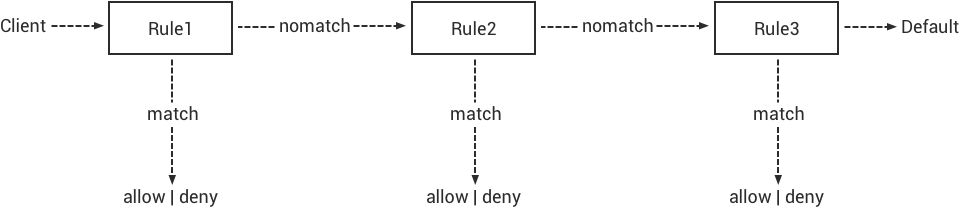
访问控制设置
EMQ X 消息服务器访问控制功能在 emqx.conf 配置文件中设置:
## 当未开启认证插件、或认证请求被所有认证插件忽略时,是否允许该用户以匿名身份登录
allow_anonymous = true

## 所有 ACL 规则都不匹配时是否允许访问
acl_nomatch = allow

## ACL 规则文件
acl_file = etc/acl.conf

## 是否开启 ACL 缓存功能
enable_acl_cache = on

## ACL 最大缓存数量
acl_cache_max_size = 32

## ACL 缓存清理周期
acl_cache_ttl = 1m

## 配置 ACL 检查失败时的操作
acl_deny_action = ignore
ACL 规则默认从 etc/acl.conf 中获取,在 EMQ X 启动时加载到内存:
%% 允许 'dashboard' 订阅 '$SYS/#'
{allow, {user, "dashboard"}, subscribe, ["$SYS/#"]}.

%% 允许来自 localhost 的客户端订阅所有主题
{allow, {ipaddr, "127.0.0.1"}, pubsub, ["$SYS/#", "#"]}.

%% 拒绝客户端订阅 '$SYS/#' and '#'
{deny, all, subscribe, ["$SYS/#", {eq, "#"}]}.

## 允许所有
{allow, all}.
ACL 规则修改后可通过命令行重新加载:
$ ./bin/emqx_ctl acl reload

reload acl_internal successfully
认证插件列表
EMQ X 支持 ClientId、Username、HTTP、OpenLDAP、MySQL、Redis、PostgreSQL、MongoDB、JWT 多种认证集成方式,以认证插件方式提供可同时加载多个形成认证链。
EMQ X 认证插件配置文件,在 /etc/emqx/plugins/(RPM/DEB 安装) 或 etc/plugins/(独立安装) 目录:
| 认证插件 | 配置文件 | 说明 |
|---|---|---|
| emqx_auth_clientid | emqx_auth_clientid.conf | ClientId 密码认证插件 |
| emqx_auth_username | emqx_auth_username.conf | Username 密码认证插件 |
| emqx_auth_ldap | emqx_auth_ldap.conf | OpenLDAP 认证/鉴权插件 |
| emqx_auth_http | emqx_auth_http.conf | HTTP 认证/鉴权插件 |
| emqx_auth_mysql | emqx_auth_mysql.conf | MySQL 认证/鉴权插件 |
| emqx_auth_pgsql | emqx_auth_pgsql.conf | PostgreSQL 认证/鉴权插件 |
| emqx_auth_redis | emqx_auth_redis.conf | Redis 认证/鉴权插件 |
| emqx_auth_mongo | emqx_auth_mongo.conf | MongoDB 认证/鉴权插件 |
| emqx_auth_jwt | emqx_auth_jwt.conf | JWT 认证插件 |
ClientID 认证插件配置
配置文件 emqx_auth_clientid.conf,配置加密方式:
## 密码 hash 方式.
##
## 值: plain | md5 | sha | sha256
auth.client.password_hash = sha256
加载 ClientId 认证插件:
./bin/emqx_ctl plugins load emqx_auth_clientid
加载插件后,可以通过以下两种方式添加 ClientId 与密码:
- 通过
./bin/emqx_ctl管理命令行添加用户:
./bin/emqx_ctl clientid add <ClientId> <Password>
通过 HTTP API 添加用户:
POST api/v3/auth_clientid
{
    "clientid": "clientid",
    "password": "password"
}
Username认证插件配置
配置文件 emqx_auth_username.conf,配置加密方式:
## 密码 hash 方式.
##
## 值: plain | md5 | sha | sha256
auth.user.password_hash = sha256
加载 Username 认证插件:
./bin/emqx_ctl plugins load emqx_auth_username
加载插件后,可以通过以下两种方式添加用户:
- 通过
./bin/emqx_ctl管理命令行添加用户:
$ ./bin/emqx_ctl users add <Username> <Password>
通过 HTTP API 添加用户:
POST api/v3/auth_username
{
    "username": "username",
    "password": "password"
}
OpenLDAP 认证插件配置
配置文件 emqx_auth_ldap.conf,配置 OpenLDAP 服务器参数:
## OpenLDAP 服务器列表
auth.ldap.servers = 127.0.0.1

## OpenLDAP 服务器端口
auth.ldap.port = 389

## OpenLDAP 连接池大小
auth.ldap.pool = 8

## OpenLDAP Bind DN.
auth.ldap.bind_dn = cn=root,dc=emqx,dc=io

## OpenLDAP Bind 密码.
auth.ldap.bind_password = public

## OpenLDAP 查询超时时间
auth.ldap.timeout = 30s

## OpenLDAP Device DN.
auth.ldap.device_dn = ou=device,dc=emqx,dc=io

## 指定的 ObjectClass
auth.ldap.match_objectclass = mqttUser

## username 的属性类型
auth.ldap.username.attributetype = uid

## password 的属性类型
auth.ldap.password.attributetype = userPassword

## 是否开启 SSL
auth.ldap.ssl = false
加载 OpenLDAP 认证插件:
./bin/emqx_ctl plugins load emqx_auth_ldap
HTTP 认证插件配置
配置文件 emqx_auth_http.conf,设置 HTTP 请求相关参数
## HTTP 请求超时时间,0 表示永不超时
## auth.http.request.timeout = 0

## 连接超时时间,0 表示永不超时
## auth.http.request.connect_timout = 0

## HTTP 请求重传次数
auth.http.request.retry_times = 3

## HTTP 请求重传间隔
auth.http.request.retry_interval = 1s

## 请求重传使用了指数退避机制, 实际重传间隔为 `interval * backoff ^ times`
auth.http.request.retry_backoff = 2.0
设置认证 URL 及其参数:
## Variables: %u = username, %c = clientid, %a = ipaddress, %P = password, %t = topic
auth.http.auth_req = http://127.0.0.1:8991/mqtt/auth
auth.http.auth_req.method = post
auth.http.auth_req.params = clientid=%c,username=%u,password=%P
设置超级用户 URL 及其参数:
auth.http.super_req = http://127.0.0.1:8991/mqtt/superuser
auth.http.super_req.method = post
auth.http.super_req.params = clientid=%c,username=%u
设置访问控制(ACL) URL 及其参数:
## 'access' parameter: sub = 1, pub = 2
auth.http.acl_req = http://127.0.0.1:8991/mqtt/acl
auth.http.acl_req.method = get
auth.http.acl_req.params = access=%A,username=%u,clientid=%c,ipaddr=%a,topic=%t
HTTP 认证/访问控制(ACL)服务器 API 设计:
认证/ACL 成功,API 返回 200

认证/ACL 失败,API 返回 4xx
加载 HTTP 认证插件:
./bin/emqx_ctl plugins load emqx_auth_http
MySQL 认证插件配置
配置文件 emqx_auth_mysql.conf, 默认的 MQTT 用户、ACL 库表和认证设置:
MQTT 认证用户表
CREATE TABLE `mqtt_user` (
  `id` int(11) unsigned NOT NULL AUTO_INCREMENT,
  `username` varchar(100) DEFAULT NULL,
  `password` varchar(100) DEFAULT NULL,
  `salt` varchar(100) DEFAULT NULL,
  `is_superuser` tinyint(1) DEFAULT 0,
  `created` datetime DEFAULT NULL,
  PRIMARY KEY (`id`),
  UNIQUE KEY `mqtt_username` (`username`)
) ENGINE=MyISAM DEFAULT CHARSET=utf8;
Note
用户可自定义认证用户表,通过 auth_query 配置查询语句。
MQTT 访问控制表
CREATE TABLE `mqtt_acl` (
  `id` int(11) unsigned NOT NULL AUTO_INCREMENT,
  `allow` int(1) DEFAULT NULL COMMENT '0: deny, 1: allow',
  `ipaddr` varchar(60) DEFAULT NULL COMMENT 'IpAddress',
  `username` varchar(100) DEFAULT NULL COMMENT 'Username',
  `clientid` varchar(100) DEFAULT NULL COMMENT 'ClientId',
  `access` int(2) NOT NULL COMMENT '1: subscribe, 2: publish, 3: pubsub',
  `topic` varchar(100) NOT NULL DEFAULT '' COMMENT 'Topic Filter',
  PRIMARY KEY (`id`)
) ENGINE=InnoDB DEFAULT CHARSET=utf8;

INSERT INTO `mqtt_acl` (`id`, `allow`, `ipaddr`, `username`, `clientid`, `access`, `topic`)
VALUES
    (1,1,NULL,'$all',NULL,2,'#'),
    (2,0,NULL,'$all',NULL,1,'$SYS/#'),
    (3,0,NULL,'$all',NULL,1,'eq #'),
    (4,1,'127.0.0.1',NULL,NULL,2,'$SYS/#'),
    (5,1,'127.0.0.1',NULL,NULL,2,'#'),
    (6,1,NULL,'dashboard',NULL,1,'$SYS/#');
配置 MySQL 服务器地址
## Mysql 服务器地址
auth.mysql.server = 127.0.0.1:3306

## Mysql 连接池大小
auth.mysql.pool = 8

## Mysql 用户名
## auth.mysql.username =

## Mysql 密码
## auth.mysql.password =

## Mysql 数据库名
auth.mysql.database = mqtt

## MySQL 查询超时
## auth.mysql.query_timeout = 5s
配置 MySQL 认证查询语句
## 认证查询语句
##
## Variables:
##  - %u: username
##  - %c: clientid
##  - %C: common name of client TLS cert
##  - %d: subject of client TLS cert
auth.mysql.auth_query = select password from mqtt_user where username = '%u' limit 1

## Password hash: plain, md5, sha, sha256, pbkdf2, bcrypt
auth.mysql.password_hash = sha256

## sha256 with salt prefix
## auth.mysql.password_hash = salt,sha256

## sha256 with salt suffix
## auth.mysql.password_hash = sha256,salt

## bcrypt with salt only prefix
## auth.mysql.password_hash = salt,bcrypt

## pbkdf2 with macfun iterations dklen
## macfun: md4, md5, ripemd160, sha, sha224, sha256, sha384, sha512
## auth.mysql.password_hash = pbkdf2,sha256,1000,20

## 超级用户查询语句
##
## Variables:
##  - %u: username
##  - %c: clientid
##  - %C: common name of client TLS cert
##  - %d: subject of client TLS cert
auth.mysql.super_query = select is_superuser from mqtt_user where username = '%u' limit 1
配置 MySQL 访问控制查询语句
## ACL 查询语句
##
## Variables:
##  - %a: ipaddr
##  - %u: username
##  - %c: clientid
auth.mysql.acl_query = select allow, ipaddr, username, clientid, access, topic from mqtt_acl where ipaddr = '%a' or username = '%u' or username = '$all' or clientid = '%c'
加载 MySQL 认证插件
./bin/emqx_ctl plugins load emqx_auth_mysql
PostgreSQL 认证插件配置
配置文件 emqx_auth_pgsql.conf, 默认的 MQTT 用户、ACL 库表和认证设置:
PostgreSQL MQTT 用户表
CREATE TABLE mqtt_user (
  id SERIAL primary key,
  is_superuser boolean,
  username character varying(100),
  password character varying(100),
  salt character varying(100)
);
Note
若用户自定义认证用户表,则需要通过 auth_query 自行配置查询语句。
PostgreSQL MQTT 访问控制表
CREATE TABLE mqtt_acl (
  id SERIAL primary key,
  allow integer,
  ipaddr character varying(60),
  username character varying(100),
  clientid character varying(100),
  access  integer,
  topic character varying(100)
);

INSERT INTO mqtt_acl (id, allow, ipaddr, username, clientid, access, topic)
VALUES
    (1,1,NULL,'$all',NULL,2,'#'),
    (2,0,NULL,'$all',NULL,1,'$SYS/#'),
    (3,0,NULL,'$all',NULL,1,'eq #'),
    (4,1,'127.0.0.1',NULL,NULL,2,'$SYS/#'),
    (5,1,'127.0.0.1',NULL,NULL,2,'#'),
    (6,1,NULL,'dashboard',NULL,1,'$SYS/#');
配置 PostgreSQL 服务器地址
## PostgreSQL 服务器
auth.pgsql.server = 127.0.0.1:5432

## PostgreSQL 连接池大小
auth.pgsql.pool = 8

## PostgreSQL 用户名
auth.pgsql.username = root

## PostgreSQL 密码
## auth.pgsql.password =

## PostgreSQL 数据库名
auth.pgsql.database = mqtt

## PostgreSQL 字符编码方式
auth.pgsql.encoding = utf8

## 是否开启 SSL
auth.pgsql.ssl = false

## auth.pgsql.ssl_opts.keyfile =

## auth.pgsql.ssl_opts.certfile =

## auth.pgsql.ssl_opts.cacertfile =
配置 PostgreSQL 认证查询语句
## 认证查询语句
##
## Variables:
##  - %u: username
##  - %c: clientid
##  - %C: common name of client TLS cert
##  - %d: subject of client TLS cert
auth.pgsql.auth_query = select password from mqtt_user where username = '%u' limit 1

## Password hash: plain, md5, sha, sha256, pbkdf2, bcrypt
auth.pgsql.password_hash = sha256

## sha256 with salt prefix
## auth.pgsql.password_hash = salt,sha256

## sha256 with salt suffix
## auth.pgsql.password_hash = sha256,salt

## bcrypt with salt prefix
## auth.pgsql.password_hash = salt,bcrypt

## pbkdf2 with macfun iterations dklen
## macfun: md4, md5, ripemd160, sha, sha224, sha256, sha384, sha512
## auth.pgsql.password_hash = pbkdf2,sha256,1000,20

## 超级用户查询语句
##
## Variables:
##  - %u: username
##  - %c: clientid
##  - %C: common name of client TLS cert
##  - %d: subject of client TLS cert
auth.pgsql.super_query = select is_superuser from mqtt_user where username = '%u' limit 1
配置 PostgreSQL 访问控制语句
## ACL 查询语句
##
## Variables:
##  - %a: ipaddress
##  - %u: username
##  - %c: clientid
auth.pgsql.acl_query = select allow, ipaddr, username, clientid, access, topic from mqtt_acl where ipaddr = '%a' or username = '%u' or username = '$all' or clientid = '%c'
加载 PostgreSQL 认证插件
./bin/emqx_ctl plugins load emqx_auth_pgsql
Redis 认证插件配置
配置文件 emqx_auth_redis.conf:
配置 Redis 服务器地址
## Redis 服务器集群类型
auth.redis.type = single

## Redis 服务器列表
auth.redis.server = 127.0.0.1:6379

## Redis Sentinel
## auth.redis.server = 127.0.0.1:26379

## Redis Sentinel 集群名称
## auth.redis.sentinel = mymaster

## Redis 连接池大小
auth.redis.pool = 8

## Redis 数据库名
auth.redis.database = 0

## Redis 密码
## auth.redis.password =

## Redis 查询超时
## auth.redis.query_timeout = 5s
配置认证查询命令
## Variables: %u = username, %c = clientid

## 认证查询命令
##
## Variables:
##  - %u: username
##  - %c: clientid
##  - %C: common name of client TLS cert
##  - %d: subject of client TLS cert
auth.redis.auth_cmd = HGET mqtt_user:%u password

## Password hash: plain, md5, sha, sha256, pbkdf2, bcrypt
auth.redis.password_hash = plain

## sha256 with salt prefix
## auth.redis.password_hash = salt,sha256

## sha256 with salt suffix
## auth.redis.password_hash = sha256,salt

## bcrypt with salt prefix
## auth.redis.password_hash = salt,bcrypt

## pbkdf2 with macfun iterations dklen
## macfun: md4, md5, ripemd160, sha, sha224, sha256, sha384, sha512
## auth.redis.password_hash = pbkdf2,sha256,1000,20

## 超级用户查询命令
##
## Variables:
##  - %u: username
##  - %c: clientid
##  - %C: common name of client TLS cert
##  - %d: subject of client TLS cert
auth.redis.super_cmd = HGET mqtt_user:%u is_superuser
配置访问控制查询命令
## ACL 查询命令
##
## Variables:
##  - %u: username
##  - %c: clientid
auth.redis.acl_cmd = HGETALL mqtt_acl:%u
Redis 认证用户 Hash
默认采用 Hash 存储认证用户:
HSET mqtt_user:<username> is_superuser 1
HSET mqtt_user:<username> password "passwd"
Redis ACL 规则 Hash
默认采用 Hash 存储 ACL 规则:
HSET mqtt_acl:<username> topic1 1
HSET mqtt_acl:<username> topic2 2
HSET mqtt_acl:<username> topic3 3
Note
1: subscribe, 2: publish, 3: pubsub
加载 Redis 认证插件
./bin/emqx_ctl plugins load emqx_auth_redis
MongoDB 认证插件配置
配置文件 emqx_auth_mongo.conf, MongoDB、MQTT 用户、ACL 集合设置:
配置 MongoDB 服务器
## MongoDB Topology 类型: single | unknown | sharded | rs
auth.mongo.type = single

## MongoDB 服务器列表
auth.mongo.server = 127.0.0.1:27017

## MongoDB 连接池大小
auth.mongo.pool = 8

## MongoDB 用户名
## auth.mongo.user =

## MongoDB 密码
## auth.mongo.password =

## MongoDB 数据库名
auth.mongo.database = mqtt

## MongoDB 超时时间
## auth.mongo.query_timeout = 5s

## 是否开启 SSL
## auth.mongo.ssl = false

## SSL keyfile.
## auth.mongo.ssl_opts.keyfile =

## SSL certfile.
## auth.mongo.ssl_opts.certfile =

## SSL cacertfile.
## auth.mongo.ssl_opts.cacertfile =

## MongoDB 写模式
## auth.mongo.w_mode =

## MongoDB 读模式
## auth.mongo.r_mode =

## MongoDB topology 选项
auth.mongo.topology.pool_size = 1
auth.mongo.topology.max_overflow = 0
## auth.mongo.topology.overflow_ttl = 1000
## auth.mongo.topology.overflow_check_period = 1000
## auth.mongo.topology.local_threshold_ms = 1000
## auth.mongo.topology.connect_timeout_ms = 20000
## auth.mongo.topology.socket_timeout_ms = 100
## auth.mongo.topology.server_selection_timeout_ms = 30000
## auth.mongo.topology.wait_queue_timeout_ms = 1000
## auth.mongo.topology.heartbeat_frequency_ms = 10000
## auth.mongo.topology.min_heartbeat_frequency_ms = 1000
配置认证查询集合
## auth_query
auth.mongo.auth_query.collection = mqtt_user

auth.mongo.auth_query.password_field = password

## Password hash: plain, md5, sha, sha256, bcrypt
auth.mongo.auth_query.password_hash = sha256

## sha256 with salt suffix
## auth.mongo.auth_query.password_hash = sha256,salt

## sha256 with salt prefix
## auth.mongo.auth_query.password_hash = salt,sha256

## bcrypt with salt prefix
## auth.mongo.auth_query.password_hash = salt,bcrypt

## pbkdf2 with macfun iterations dklen
## macfun: md4, md5, ripemd160, sha, sha224, sha256, sha384, sha512
## auth.mongo.auth_query.password_hash = pbkdf2,sha256,1000,20

## 认证 Selector
##
## Variables:
##  - %u: username
##  - %c: clientid
##  - %C: common name of client TLS cert
##  - %d: subject of client TLS cert
auth.mongo.auth_query.selector = username=%u

## 超级用户 Selector
auth.mongo.super_query = on

auth.mongo.super_query.collection = mqtt_user

auth.mongo.super_query.super_field = is_superuser

auth.mongo.super_query.selector = username=%u
配置 ACL 查询集合
## 是否开启 ACL 功能
auth.mongo.acl_query = on

auth.mongo.aclquery.collection = mqtt_acl

## ACL Selector.
##
## Variables:
##  - %u: username
##  - %c: clientid
auth.mongo.aclquery.selector = username=%u
MongoDB 数据库
use mqtt
db.createCollection("mqtt_user")
db.createCollection("mqtt_acl")
db.mqtt_user.ensureIndex({"username":1})
Note
数据库、集合名称可自定义
MongoDB 用户集合示例
{
    username: "user",
    password: "password hash",
    is_superuser: boolean (true, false),
    created: "datetime"
}

db.mqtt_user.insert({username: "test", password: "password hash", is_superuser: false})
db.mqtt_user:insert({username: "root", is_superuser: true})
MongoDB ACL 集合示例
{
    username: "username",
    clientid: "clientid",
    publish: ["topic1", "topic2", ...],
    subscribe: ["subtop1", "subtop2", ...],
    pubsub: ["topic/#", "topic1", ...]
}

db.mqtt_acl.insert({username: "test", publish: ["t/1", "t/2"], subscribe: ["user/%u", "client/%c"]})
db.mqtt_acl.insert({username: "admin", pubsub: ["#"]})
加载 MognoDB 认证插件
./bin/emqx_ctl plugins load emqx_auth_mongo
JWT 认证插件配置
配置 JWT 认证
## HMAC hash secret
auth.jwt.secret = emqxsecret

## 配置 JWT 字符串从何处获取
auth.jwt.from = password

## RSA or ECDSA 公钥文件
## auth.jwt.pubkey = /etc/certs/jwt_public_key.pem

## 是否验证 claims 字段
auth.jwt.verify_claims = off

## 要验证的 claims 清单
## auth.jwt.verify_claims.username = %u
加载 JWT 认证插件
./bin/emqx_ctl plugins load emqx_auth_jwt